

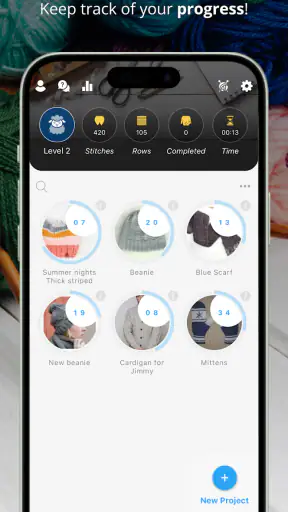
When I return to a half-finished sweater or pick up a crochet project after a busy week, the hardest part is often not the next stitch. It is remembering where I stopped, which repeat I was following, and whether the number in my notebook belongs to the current piece. My Row Counter: Knit & Crochet, from Annapurnapp Technologies GmbH, is designed around that very practical problem. I found it most useful as a project companion: a place to keep a pattern nearby, count progress, and reduce the small bits of mental bookkeeping that interrupt handwork.
This is a free lifestyle app for knitters and crocheters, rated for Everyone. It has been available since January 31, 2018, and its reception is unusually strong, with a 4.8 average from around 15 thousand ratings. More than a million people have installed it, which makes the idea feel well established rather than experimental. Optional in-app purchases range from $0.99 to $14.99 per item, so the basic starting point is approachable, while some more advanced use may involve spending money.
From an unfinished project to a reliable next step
Starting with the project in front of me
I would not open this app simply to browse a catalog or pass time. Its value appears when I already have yarn in my hands and a project that needs tracking. The starting condition might be a cardigan paused at the end of a repeat, a pair of socks with separate left and right sections, or a crochet blanket where several color changes make it easy to lose the count. Instead of relying on a scrap of paper or trying to remember “somewhere around row thirty,” I can set up a digital record that stays connected to the work.
The first useful decision is to treat each project as its own workspace. That sounds simple, but it changes how I think about progress. A row count is not meaningful by itself: it belongs to a particular piece, pattern, size, and section. Keeping those elements together is more dependable than maintaining one general counter and hoping I remember what it represented. For anyone who rotates several works in progress, this separation is one of the app’s most practical strengths.
I also like that the app is aimed at both knitting and crochet rather than forcing every user into the same terminology. The actual handwork remains the important part; the app’s job is to support the rhythm around it. That makes it suitable for a beginner who needs help building a counting habit, but also for an experienced maker managing patterns with many repeats and interruptions.
Bringing a pattern into the same workflow
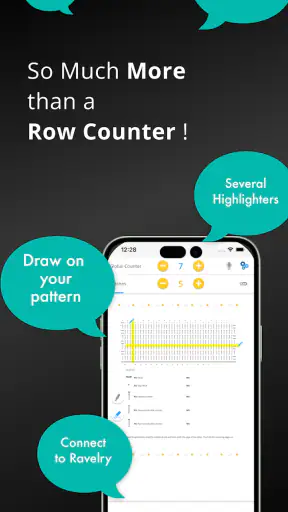
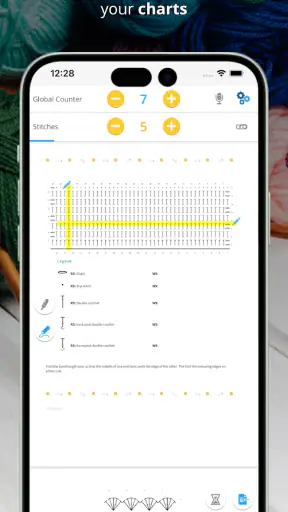
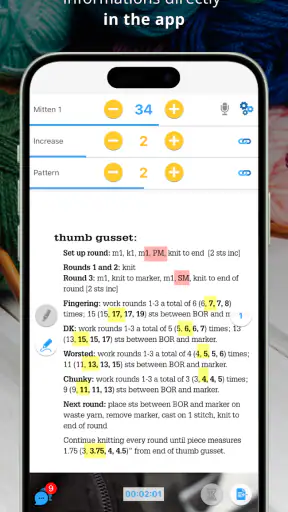
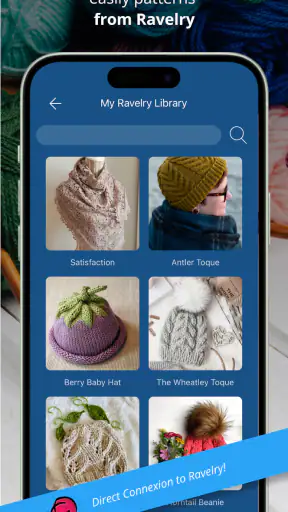
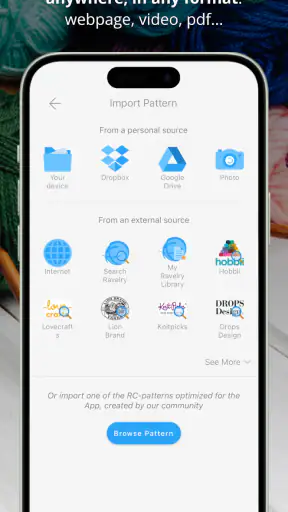
The biggest step beyond a basic tally counter is pattern handling. My Row Counter can be used with imported patterns, which means I do not have to keep switching between a separate document and a counter every time I finish a row. In a realistic session, I can open the project, find the relevant instructions, work through the next section, and update progress without losing the place where the written directions are displayed.
This is especially helpful when a pattern contains several instructions that look similar at a glance. A plain counter tells me that I have advanced; it does not tell me what that advance means. A pattern beside the count gives the number context. I can check whether I am on the increase section, a repeat, or a finishing row instead of trusting memory alone.
There is a trade-off here. Importing a pattern is more preparation than writing a number on paper. If I am starting a very small project with only a few rows, setting up a digital record may feel slower than grabbing a pencil. The benefit grows with complexity and duration. I would spend the extra setup time on a garment, a detailed shawl, or a long crochet motif, but probably not for a quick swatch.
Using the counter without breaking concentration
Once the project is ready, the central routine is straightforward: work a row or a meaningful section, then register the progress. The app is most effective when I make that update part of the physical rhythm of finishing a row, rather than postponing several updates and trying to reconstruct them later. A counter is only as accurate as the habit around it, and no interface can repair a forgotten sequence perfectly.
For patterns built from repeated units, I would use the count as a checkpoint rather than as a substitute for reading. For example, if a sleeve requires a repeat across several rows, the count can tell me which pass I am on while the pattern supplies the actual stitches. This division of labor matters: the app reduces memory load, but it does not remove the need to understand the instructions.
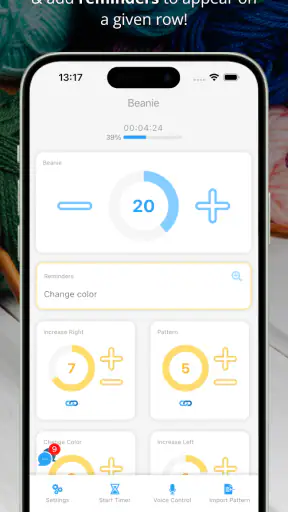
The timer is another useful part of the workflow. I would use it when I want to measure a focused crafting session or simply create a clear beginning and ending point. A timer can also expose an important personal detail: whether a project is genuinely progressing or merely being carried from room to room. I would not treat the result as a productivity score, but as a gentle way to notice how much uninterrupted time a pattern really demands.
Highlighter support for dense instructions
The highlighter is more valuable than it first sounds. Long patterns often become difficult not because the individual directions are impossible, but because the eye keeps jumping between the current row, a repeat, and an exception. Marking the part I am actively using can reduce that visual search. I find this particularly relevant for patterns with a repeated chart or a long written sequence where one missed phrase changes the next several rows.
A good way to use it is to move the highlight only after completing the current instruction, not every time I glance at the screen. That keeps the app aligned with the physical work. I would also avoid highlighting too much at once. The purpose is to create a temporary visual anchor; if the whole pattern is emphasized, the advantage disappears.
This feature does not make every imported pattern equally comfortable. Formatting can vary between pattern sources, and a digital view may still be less natural than a printed page for someone who prefers to annotate freely. The highlighter helps with focus, but it is not a replacement for the flexibility of paper, especially when I want to sketch a custom alteration beside the original directions.
Managing interruptions and handoffs
The most realistic test is not a quiet evening with perfect concentration. It is the interrupted project: I work a few rows while watching television, put the piece down to answer a message, and return later after forgetting whether I had already counted the final row. This is where a dedicated record earns its place. Before stopping, I can leave the project at a known point instead of relying on a vague memory.
There is also a handoff between the digital pattern and the physical object. The screen can say where I should be, but the stitches in front of me reveal whether that instruction has actually been completed. I still recommend checking a distinctive feature, such as a cable crossing, increase, color change, or completed repeat, before continuing after a long pause. The app supports the handoff; it cannot inspect the fabric and confirm that every stitch matches the plan.
For shared household projects, the handoff is less seamless than it may be in a single-user routine. If another person works on the same piece, both people need to follow the same counting discipline. A digital counter can make the current state clearer than a loose note, but it does not remove the need to communicate what was completed and whether a row was counted at its beginning or end.
A practical evening with a complicated project
Imagine I am working on a textured cardigan after dinner. The pattern has a repeating body section, a separate sleeve instruction, and a reminder to change the shaping at a particular point. I open the project, bring up the pattern, and use the counter to identify the current row. The highlighter keeps my eye on the active instruction, while the timer gives the session a definite start. After finishing a repeat, I update the count and pause the project before putting the knitting away.
The next morning, the benefit is not that the app has done the knitting for me. The benefit is that I can resume with less detective work. I still compare the last visible shaping detail with the written instruction, but I am no longer trying to remember three separate things: the row number, the location in the pattern, and how long I had been working. That reduction in small decisions makes the next session feel more inviting.
For crochet, the same workflow applies but the counting problem can look different. A large motif, a turning chain, or repeated clusters can make it easy to lose the point where a round began. A counter can preserve the round or section number, while the pattern remains the authority for the stitch sequence. I would be especially careful with projects where the first stitch of a round is easy to confuse with the joining step; the digital number helps, but a physical marker or visual check may still be necessary.
Where it compares well with ordinary alternatives
The usual alternatives are a paper notebook, a pencil mark on the pattern, a row-counter accessory, or a general notes app. Paper is wonderfully quick and works without a screen, but it can scatter information across several pages and becomes awkward when I rotate between projects. A physical counter is immediate and tactile, yet it normally tracks a number without holding the surrounding pattern or session context.
A general notes app is flexible, but that flexibility can become friction. I have to create my own structure for project names, row counts, pattern text, and reminders. My Row Counter is more purpose-built for the relationship between a pattern and repeated progress. That specialization is its main reason to exist, and it is also why someone who only needs occasional notes may find it more elaborate than necessary.
The app is not automatically better than paper in every setting. If I craft outdoors, work where a phone could be exposed to yarn, water, or dirt, or simply dislike checking a screen while stitching, a notebook may be the calmer choice. Likewise, a person who improvises every row may gain little from imported pattern support. The app is strongest when there is a defined sequence to follow and a meaningful risk of losing one’s place.
Small workflow choices that make a big difference
My first tip is to record progress at a natural boundary. For knitting, that may be the completed row; for crochet, it may be the completed round or motif section. Choosing one rule and keeping it consistent prevents the classic confusion between “the row I am on” and “the row I have finished.” The app can store the number, but I have to define what that number means.
My second tip is to use the timer as a session boundary rather than trying to turn crafting into a competition. Starting it when I begin and stopping it when I put the project away creates a useful record of attention. If I am repeatedly surprised by how long a small section takes, that information can help me plan future sessions and decide whether a pattern is realistic for a particular evening.
My third tip is to keep the physical project and the digital project visually connected. I would name or organize the project clearly enough that I can recognize it immediately, particularly when several works use similar yarn colors. This avoids the subtle but serious mistake of opening the right pattern with the wrong counter. Digital organization matters just as much as the counting feature.
My fourth tip is to use the highlighter for transitions, not decoration. I would mark the instruction I need now, complete it, verify the fabric, and then move the focus forward. On a dense pattern, that sequence is safer than scrolling around while holding needles or a hook. It also gives me a repeatable recovery method when an interruption occurs.
What may frustrate regular users
The first source of friction is setup. The app offers more than a single tap counter, so users need to decide how to represent their projects and how to work with imported patterns. That is a fair exchange for the extra organization, but it means the first session may not feel as instant as using a paper tally. Beginners may need a little time to develop a reliable counting routine.
The second issue is dependence on a phone-centered workflow. A screen can be distracting, especially for people who prefer crafting as a break from devices. Notifications, battery concerns, and the simple inconvenience of handling a phone with yarn nearby can outweigh the organizational benefit. I would not recommend making it the only record for a valuable project until I had established a habit of saving progress consistently.
The third issue is that a counter cannot correct an error in the fabric. If I accidentally tap twice, forget to tap, or resume from the wrong section, the digital record may look precise while being wrong. The safest approach is to pair the number with a visual landmark in the work. That extra check is not a weakness unique to this app; it is an unavoidable limitation of any tool that records actions without seeing the stitches.
The optional purchases also deserve a practical thought. The app is free to start, but some capabilities or additions may involve individual purchases between $0.99 and $14.99. I would first test whether the basic workflow fits my habits before paying for anything. A casual maker may never need more, while someone managing many detailed projects may consider the added convenience worthwhile. The right choice depends on how often the app replaces paper, not on collecting every available option.
Who should use it, and who should skip it
I would recommend My Row Counter to anyone who regularly loses track of rows, switches between several works in progress, or follows patterns that are too involved for a single handwritten mark. It is also a strong fit for makers who want their pattern, count, timer, and visual focus in one crafting-oriented workflow. The combination becomes more useful as projects become longer and interruptions become more common.
I would be more cautious about recommending it to someone who works almost entirely from memory, improvises without written patterns, or wants a completely screen-free hobby. A simple physical counter may be faster for a repetitive scarf, and paper may be better for a designer who constantly writes changes in the margins. The app’s strengths come from structure, so users who deliberately avoid structure may experience its organization as extra work.
After using it as a project companion, I see the main result as confidence at the point of resuming. It does not replace pattern knowledge, stitch markers, or checking the fabric, but it brings several fragile parts of the process together. The pattern tells me what to do, the counter records where I am, the highlighter keeps attention in the right place, and the timer helps define the session.
My overall impression is favorable because the app addresses a real, ordinary frustration rather than trying to transform knitting or crochet into something else. Its 4.8 average and broad reach suggest that the approach resonates with many makers, but my recommendation is still conditional: use it when project continuity is the problem. If your work is short, improvised, or intentionally device-free, the usual alternatives may be simpler. If you often return to a complicated piece and spend the first few minutes reconstructing your progress, this is where a dedicated row-counting workflow earns its place.
For me, the best outcome is not a more impressive number on a screen. It is being able to put the project down without anxiety and pick it up later with a clear next move. That is a modest promise, but for a long knitting or crochet project, it can be the difference between steady progress and another unfinished item in the basket.


